Exploring Web Server Configurations for Different Use Cases 🌐

👋 Hello! I'm passionate about DevOps and have over 1+ years of experience in the field. I'm proficient in a variety of cutting-edge technologies and always motivated to expand my knowledge and skills. Let's connect and grow together!
SKILLS:
🔹 Languages & Runtimes: Python, Shell Scripting, HCL, YAML 🔹 Cloud Technologies: AWS, Microsoft Azure, GCP 🔹 Infrastructure Tools: Docker, Terraform, AWS CloudFormation 🔹 Other Tools: Linux, Git and GitHub Actions, Jenkins, Jira, GitLab (beginner), Docker, AWS DevOps 🔹 Web Development: HTML, CSS, Bootstrap, Python, SQL
Job & Responsibilities:
🚀 Improved development efficiency by implementing CI/CD pipelines, resulting in a 30% reduction in deployment time on the test server. 🔒 Strengthened deployment and testing reliability by utilizing Docker containers and optimizing Dockerfile, reducing development issues on the test server by 20%. ⚙️ Automated S3 bucket log creation with Shell scripting, eliminating 100% of manual search and saving 2 hours per week. 📅 Scheduled EC2 instance start/stop using Lambda functions and Event Bridge, leading to a 25% decrease in infrastructure costs. 🔧 Utilized AWS, Linux, Python, Docker, Shell scripting, Terraform, Jenkins Pipelines, and automation to streamline workflows and improve overall system performance.
I'm very detail-oriented and possess strong written and verbal communication skills. As a high performer with a possibility mindset, I strive to solve problems using efficient approaches.
Let's Connect & Grow:
If you find my profile suitable for the role you are searching for, please feel free to reach out to me at sumanprasad9766@gmail.com.
📍Introduction:
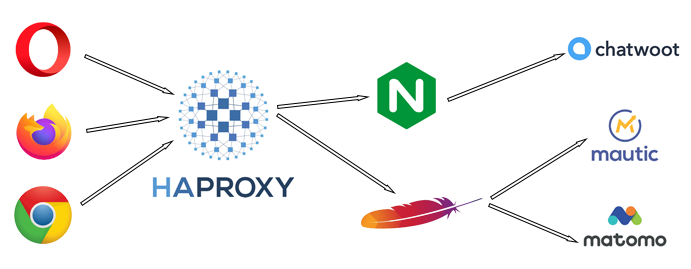
In the world of web hosting and applications, the choice of a web server plays a crucial role in determining the performance, security, and accessibility of your online presence. Let's dive into the setup of three popular web servers—nginx, HAProxy, and Apache 2—each tailored to distinct use cases. 🚀
Nginx - Restricting Access Using nginx.conf 🚧
Use Case: Control Access to Sensitive Areas
Steps:
📝 Open your nginx configuration file at
/etc/nginx/nginx.conf.📝 Within the
serverblock, add alocationblock for the restricted area:server { listen 80; server_name yourdomain.com; location /restricted { deny all; return 403; } # ... other configuration ... }💾 Save the configuration file and restart nginx:
sudo systemctl restart nginx🌐 Accessing
/restrictedwill now yield a 403 Forbidden error.

HAProxy - Software Load Balancing & SSL Certificates ⚖️🔐
Use Case: Load Balancing and SSL Termination
Steps:
📝 Install HAProxy using:
sudo apt-get install haproxy📝 Edit your HAProxy configuration file at
/etc/haproxy/haproxy.cfg.📝 Configure the frontend for SSL termination:
 frontend https_frontend
     bind *:443 ssl crt /etc/haproxy/ssl/your_certificate.pem
     mode http
     option httplog
     default_backend backend_servers
📝 Define the backend servers:
 backend backend_servers
     mode http
     balance roundrobin
     server webserver1 192.168.1.10:80
     server webserver2 192.168.1.11:80
     # Add more servers as needed
💾 Save the configuration and restart HAProxy:
sudo systemctl restart haproxy
Apache 2 - Setting Up a Web Server 🛠️
Use Case: Basic Web Hosting
Steps:
📝 Install Apache 2 with:
sudo apt-get install apache2📝 Place your website files in
/var/www/html.📝 Create a virtual host configuration:
sudo nano /etc/apache2/sites-available/your_site.conf<VirtualHost *:80> ServerName yourdomain.com DocumentRoot /var/www/html/your_site # Other configuration directives </VirtualHost>📝 Enable the virtual host and necessary modules:
 sudo a2ensite your_site.conf
 sudo a2enmod rewrite
📝 For SSL, use Let's Encrypt certificates with
certbot:sudo apt-get install certbot python3-certbot-apache sudo certbot --apache💾 Restart Apache:
sudo systemctl restart apache2
Choose the Right Web Server for Your Needs! 🛡️
📍 Conclusion:
Each web server discussed above has its strengths, making them suitable for different scenarios. Nginx excels at access control, HAProxy shines as a load balancer and SSL terminator, and Apache 2 offers a robust foundation for general web hosting. Tailor your choice to your project's unique requirements and enjoy a seamlessly running web application. 🚀🌐.
🔍 Checkout GitHub Repository for projects:
🔗 https://linktr.ee/sumanprasad007